13SICK Support
Before you start your first shift please watch our training videos to get yourself up to speed
- 13SICK Support
- Telehealth
- General FAQ
- Do I need an App to use 13SICK Software?
- How to call Dispatch and Telehealth teams whilst on shift
- Who do I contact if I need help and support?
- What times are defined as the ‘After Hours’ period
- How to I apply for Realtime Prescription Monitoring (e.g. SafeScript / Qscript)?
- Medications with misuse potential
- What is DR2?
- How do I order PBS Stationary?
- General FAQ
- Telehealth FAQ
- Am I allowed to bill Medicare if I am overseas?
- Am I allowed to bill Medicare if the patient is overseas
- Aged Care
- How to start an Aged Care Telehealth consultation
- Aged Care Prescribing Platforms
- How to use Medimap
- Additional 13SICK software functions for Aged Care Telehealth
- GP Consults – making videos easier
- When does nurse handover happen in ACFs and how does that impact consultations?
- NICE guidelines – selecting which adults need a CT head
- Medications to use in Palliative Care
Training videos
Click here to access Training Videos 👉
Telehealth
Home Visits
1. How to add patients to your list and create a driving map
2. How to start a consultation when you have arrived
3. How to requeue patients
4. How to add additional patients to your list
5. How to Copy Nursing Home notes into DaVinci
6. How to add patients into DaVinci at an Aged Care Facility – photo function
80/20 and 30/20 Guide
This tool helps Doctors understand the 80/20 and 30/20 rule for MBS service items. It is intended as a guide only and Doctors need to be aware of their responsibilities when billing Medicare. Remember that the total MBS services is for all your Provider numbers for a 24 hour period from midnight to midnight.
eTG Guidelines – Antibiotic Summary 2025
Click here to read 2025 eTG antibiotic guidelines
Frequently Asked Questions
General FAQ
Do I need an App to use 13SICK Software?
Our software not need an app to run. You can login on any web browser on your Smartphone, Laptop, Tablet device or Desktop
How to call Dispatch and Telehealth teams whilst on shift
Please use the phone numbers below to contact the Dispatch team:
- Victoria: (03) 8416 9666
- Tasmania: (03) 8692 8532
- Sydney: (02) 9424 7904
- Newcastle / Canberra: (02) 9424 7914
- Brisbane/Toowoomba/SSC: (07) 3239 7904
- Gold Coast: (07) 3239 7922
- Adelaide: (08) 8130 3555
- Perth: (08) 8130 3309
Who do I contact if I need help and support?
For all Doctor support enquiries please email drsupport@dr2.com.au
For all finance enquiries please email finance@dr2.com.au
If you need help and support whilst on shift please call the Dr Hotlines above
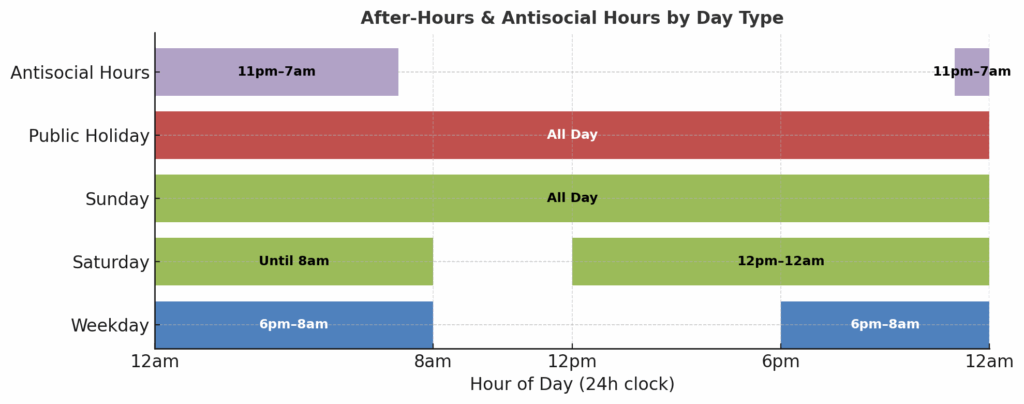
What times are defined as the ‘After Hours’ period
The After Hours period is defined as:
Monday to Friday: 6pm – 8am
Saturday and Sunday : from 12pm Saturday, all day Sunday
Public Holidays: All day
Antisocial Hours: For MBS purposes the antisocial hours are defined as 11pm – 7am
How to I apply for Realtime Prescription Monitoring (e.g. SafeScript / Qscript)?
Working on Telehealth you may see patients in different states from you. We recommend getting Realtime prescribing in all states. Use the links below to apply:
- Australian Capital Territory
- New South Wales
- Northern Territory
- Queensland
- South Australia
- Tasmania
- Victoria
- Western Australia
Medications with misuse potential
As Doctors we have to be mindful of medications that have potential to cause harm. Medicines monitored in SafeScript Victoria include:
| Type of prescription | Examples |
| Strong opioid painkillers | Buprenorphine, Codeine, Fentanyl, Hydromorphone, Methadone, Morphine, Oxycodone, Pethidine, Tapentadol. |
| Strong medicines for anxiety or sleeping tablets (benzodiazepines) | Alprazolam, Flunitrazepam, Bromazepam, Clobazam, Clonazepam, Diazepam, Lorazepam, Midazolam, Nitrazepam, Oxazepam, Temazepam. |
| Other strong sleeping tablets | Zolpidem, Zopiclone. |
| Stimulants for ADHD or narcolespsy | Dexamphetamine, Lisdexamfetamine, Methylphenidate. |
| Other high-risk medicines | Esketamine, Ketamine, Quetiapine, Pregabalin, Gabapentin, Tramadol. |
Reference: https://www.health.vic.gov.au/drugs-and-poisons/medicines-monitored-in-safescript
What is DR2?
DR2 is the parent company that owns 24/7 Healthcare. When you receive a service fee from 13Sick the name on the Invoice will be DR2

How do I order PBS Stationary?
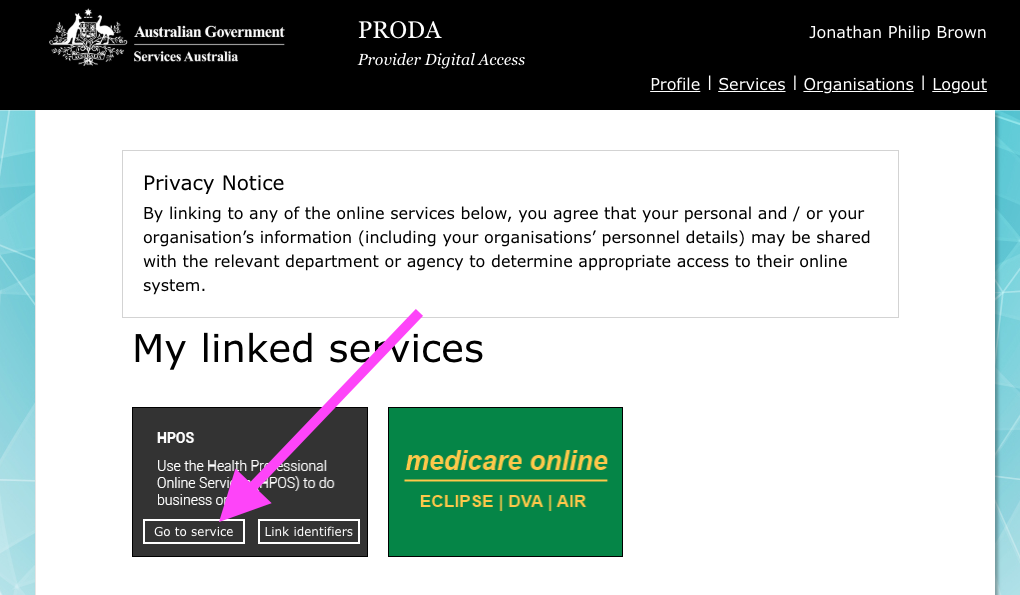
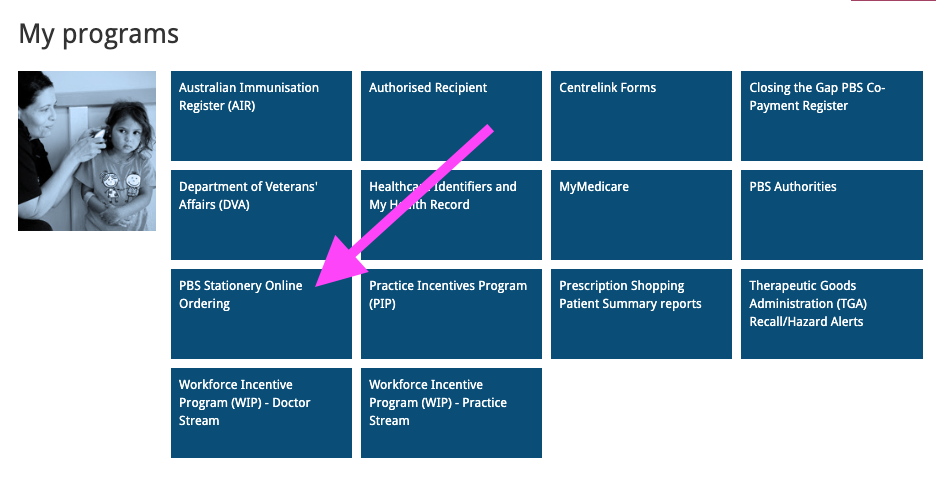
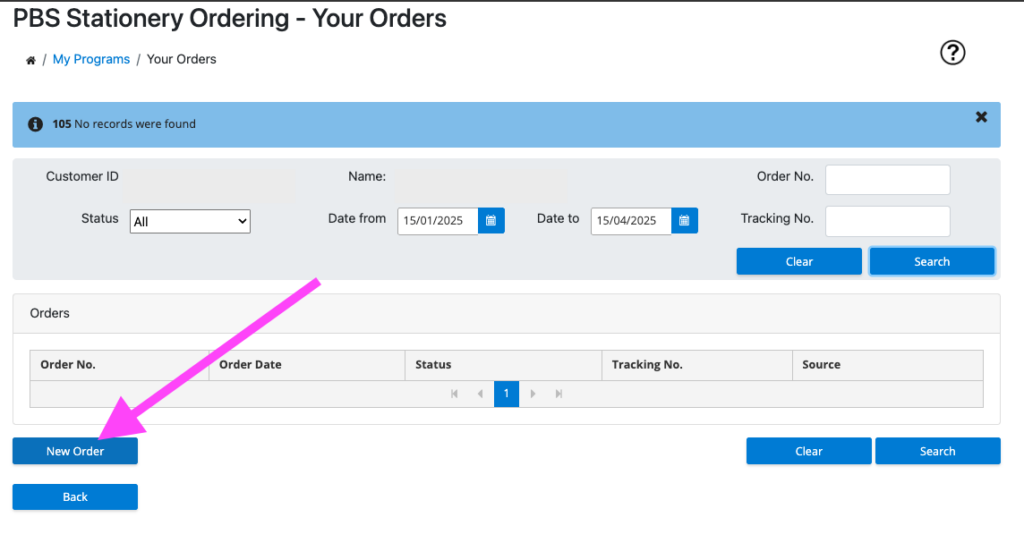
PBS stationary can be ordered through your online PRODA account by logging into PRODA and following the links below
- Click on ‘Go to service’
2. Click on ‘My programs’
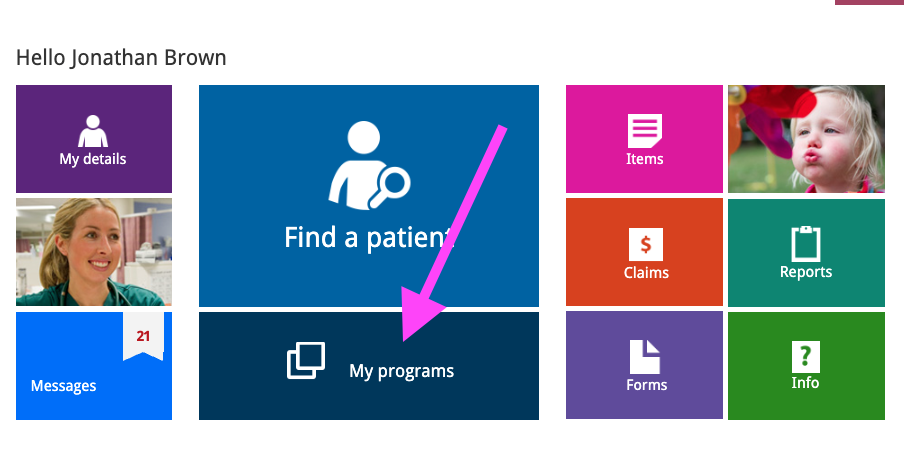
3. In My Programs click on ‘PBS stationery ordering’
4. Select ‘New Order’ and request your stationery items
Technical / Software Questions
How do I use 13SICK software on my mobile phone?
How to add 13SICK software to your Iphone / Android / Home screen
iOS Devices
Android Devices
- Open Safari and navigate to the web page you want to add as an app icon.
- Tap the Share icon (the square with an arrow pointing out of the top).
- Scroll through the options and select Add to Home Screen.
- You can rename the shortcut if you want, then tap Add.
- The icon will now appear on your home screen, and tapping it will open the web page in Safari.
- Open Chrome and go to the web page you wish to add to your home screen.
- Tap the menu icon (three dots in the upper right corner).
- Tap Add to Home screen.
- You can rename the shortcut, then tap Add.
- The shortcut will appear on your home screen, and tapping it will open the web page in Chrome.
Pinning a Website using Microsoft Edge
- Open Microsoft Edge and navigate to the website you want to create a shortcut for.
- Click the ellipsis (…) menu in the top right corner of the browser.
- Select More tools and then choose Pin to taskbar or Pin to Start.
- Pin to taskbar will add the website shortcut to your taskbar.
- Pin to Start will add the website as a tile to your Start menu.
This creates a tile or a taskbar icon that directly opens the website in Edge, much like launching an application.
For other browsers like Chrome on Windows:
- Navigate to the website.
- Click the three-dot menu in the upper-right corner.
- Choose More tools and then Create shortcut.
- Rename the shortcut if desired and check “Open as window” for a more app-like experience.
- This will create a shortcut on your desktop, which you can then manually pin to your Start menu or taskbar if you prefer.
Pathology / Radiology
Can I request pathology and radiology? How do I get results?
Please bear in mind that when requesting tests you are responsible for following up results.
You can request radiology and pathology on our software. Results are received by fax-to-email and you will receive the result from the admin staff when it comes through.
We always recommend adding ‘copy to {{GP name}}’ on the investigation to keep the regular GP is looped in but you still have the responsibility of chasing up the result.
Patient access to Documents and Scripts
How do patients access their documents and scripts after a consultation
Patients only receive referrals, medical certificate and ends the patient receives an SMS with a link to download their documents and eScripts once you have clicked ‘End Consult’.
Patients can also visit the link https://app.13sick.com.au/documents, enter their mobile number and DOB and then access their documents and scripts once. As a security measure, 2 Factor Authentication is in place to send patients an SMS to verify their phone number.
Medicare Billings
Does 13SICK software check that a patient has a valid Medicare card?
13SICK software has been built to take as much of the admin away from you as possible so you can focus on Doctoring.
All patients that book on 13SICK have to have a valid Medicare card to be able to book a consultation. 13SICK software checks with Medicare for you 😀
How do I bill a 10990 / 75870?
13SICK software automatically bills a 10990 or 75870 depending on the billing item that you have selected. Simple!
Finance and Getting paid
How do I change my bank details in PRODA?
How and when do I get paid?
Billings will be paid by Medicare directly into your bank account! Update your PRODA to have your own bank details. Each day, all completed consultations are invoiced to Medicare through Medipass (Tyrohealth)
Once Medicare completes their checks a payment will be made for those invoices. This usually occurs within 2 business days of the consultation being completed. Only one payment is made to your bank account per business day so each payment contains multiple consultations.
How are Medicare rejections managed?
For any invoices that are rejected, our operations team investigates. Over 98% of rejections are due to provider number issues and can be resolved easily. Once the issue is resolved, rejected invoices are resubmitted by finance
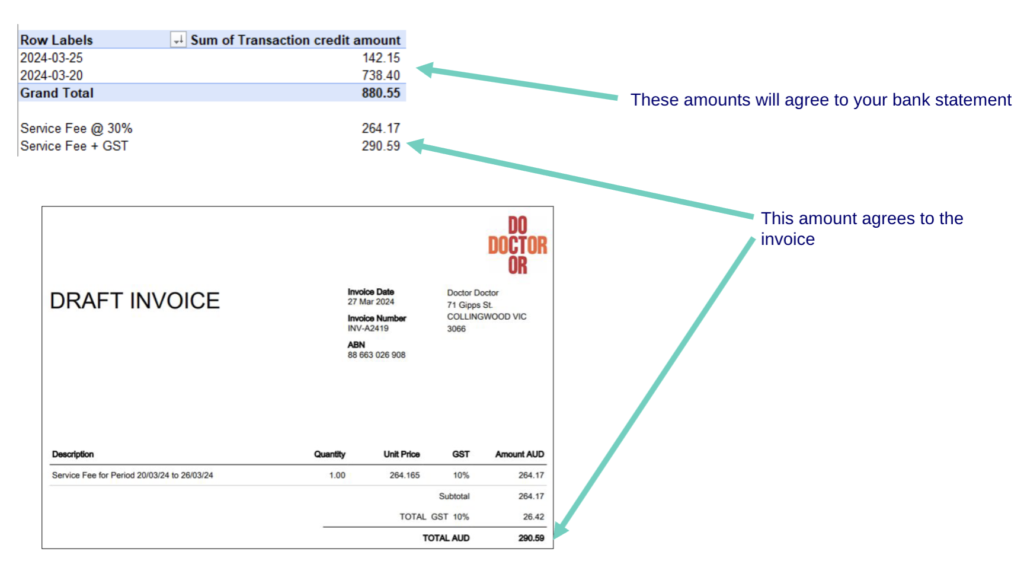
How and when am I charged my Service Fee? How and when do I get a tax invoice?
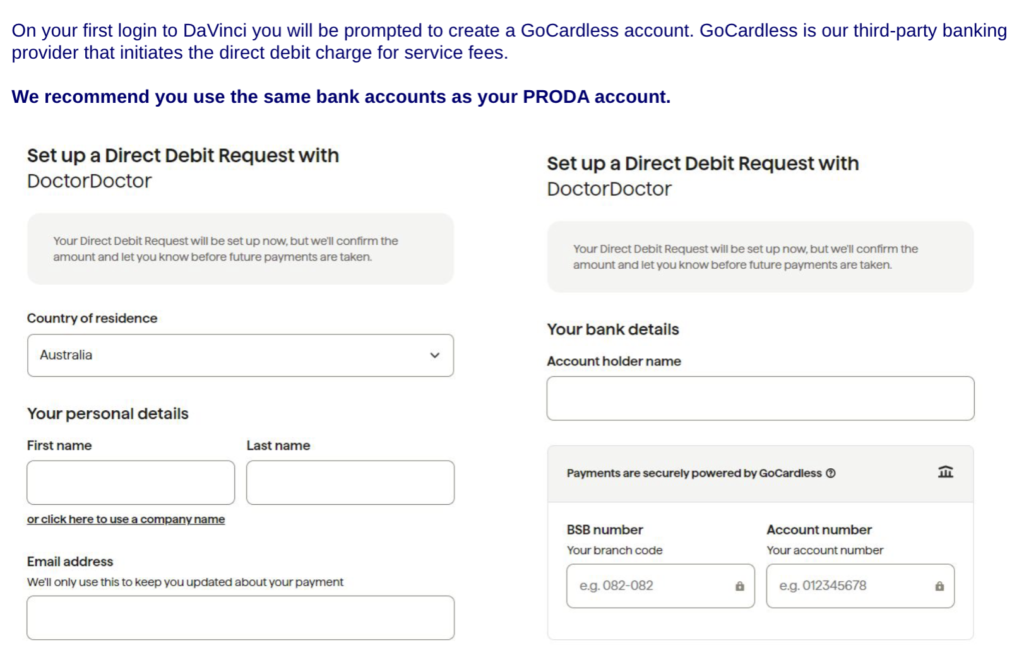
Every Wednesday you will receive a service fee invoice and breakdown of consultations that have been paid for the previous 7 days. Service fee payment is automated through GoCardless and will be direct debited from your bank account. The direct debit charge is initiated on Fridays.
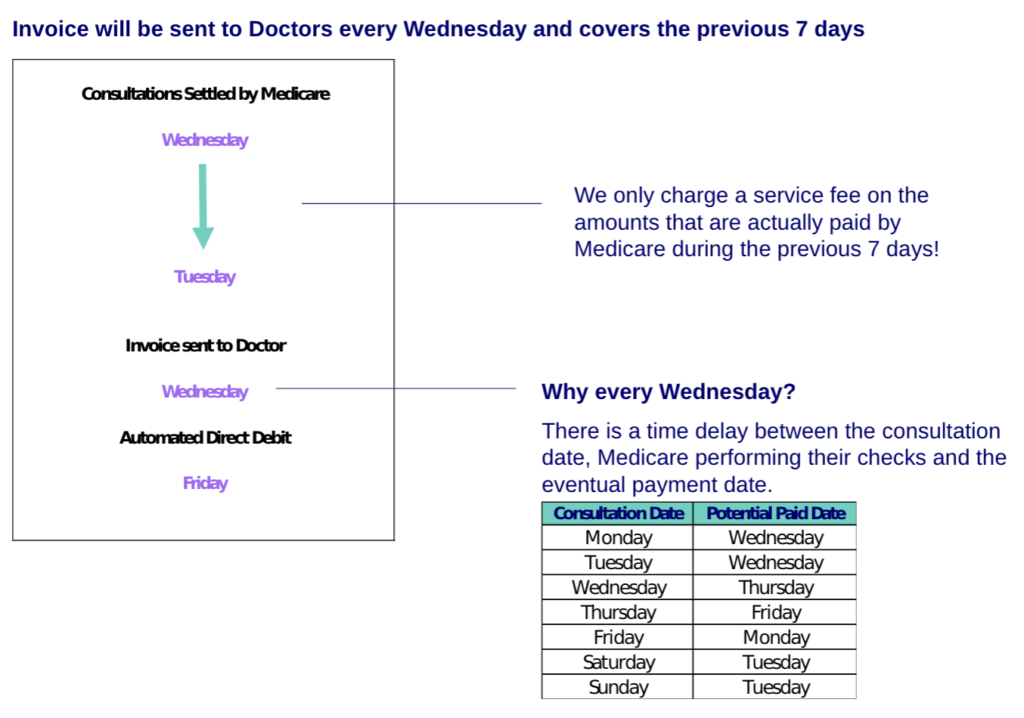
What does my Service Fee invoices look like?
Service Fees by Direct Debit. What is GoCardless and how do I set it up?
How do I change the bank details that I use to pay my service fee?
To change the bank details that you use to pay your service fee by Direct Debit please email: finance@dr2.com.au. Finance will then email you a new link to re-register for Direct Debit
Telehealth FAQ
How do I make a referral to ED if a patient needs to attend?
If you need to refer a patient to ED then go to the ‘Refer’ tab and type ‘Emergency’. Select one of the generic Emergency names from the list and click on it to write your referral
Can I send an SMS to a patient using 13SICK software?
No – at the moment we don’t have the ability to send SMS when you are logged in.
Am I allowed to bill Medicare if I am overseas?
No – you are not allowed to bill Medicare if you are overseas
Am I allowed to bill Medicare if the patient is overseas
No – you cannot billed Medicare if the patient is overseas
What is the 80/20 rule and the 30/20 rule for Telehealth?
In Australia, the 80/20 and 30/20 rules for Telehealth are designed to ensure high-quality care and appropriate use of Medicare benefits. The 80/20 and 30/20 rules apply for ALL YOUR PROVIDER NUMBERS for a midnight to midnight billing period. This means if you are billing item numbers in the daytime at your regular GP practice these contribute to your ’80’ and ’30’ video and phone item totals.
1. 80/20 Rule: This rule states that a GP who provides 80 or more professional attendances on 20 or more days within a 12-month period is presumed to have engaged in inappropriate practice. This rule applies to both in-person and telehealth consultations. It is meant to prevent over-servicing and ensure that each consultation meets a high standard of care.
2. 30/20 Rule: Introduced on 1 October 2022, this rule specifically targets telehealth phone consultations. Under this rule, any GP, other medical practitioner (OMP), or consultant physician who provides 30 or more telephone attendance services on 20 or more days within a 12-month period will be referred to the Professional Services Review (PSR) for further investigation. The aim is to balance the accessibility provided by telehealth with maintaining high standards of patient care
Aged Care Telehealth
How to start an Aged Care Telehealth consultation
In 13SICK software you will have either the landline number for the aged care facility or the mobile number for the ward.
If you have the landline – call this and ask to speak to the RN in charge. You can then either do a phone consult if appropriate but if you want to do a video consult ask the RN in charge for the mobile on the ward or their mobile phone number. Click on the ‘Send Link’ button in the top right of 13SICK software to send the nurse a link for them to join the consultation
Aged Care Prescribing Platforms
The main prescribing platforms for Aged Care that we use are BestMed and Medimap.
BestMed
BestMed – https://my.bestmed.com.au/Account/Login. Our team will register you for BestMed and you will receive your username and password in an email. Once your have your username and password you can login to BestMed
Medimap
Medimap – you can register yourself for Medimap using this link: https://help.medimap.health/hc/en-au/requests/new?ticket_form_id=38115008303373
How to use Medimap
Additional 13SICK software functions for Aged Care Telehealth
- Send the nurse an SMS to start a consultation – click on the ‘Send Link’ button then ask the nurse for their mobile phone number. The nurse will receive an SMS with a link to join the consultation and once they join you can click on your video button to start a video consultation

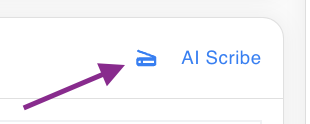
2. After a consultation ends you can email or fax your notes to the facility using the button below (next to the AI scribe button)
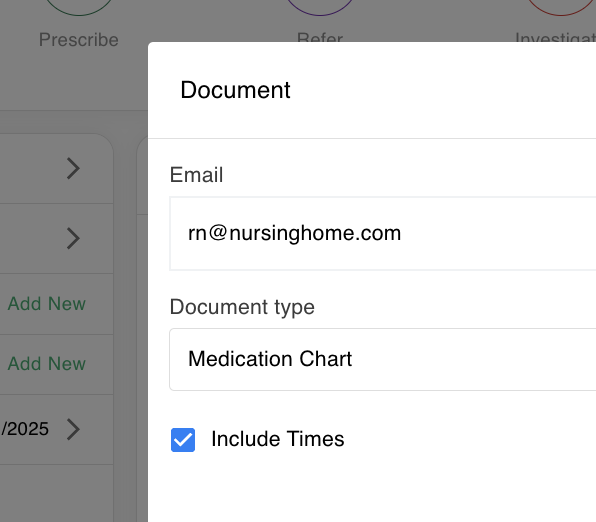
3. Send a drug chart – if you have prescribed on 13SICK software and selected times for the medication you can email a copy of the drug chart to the facility using the ‘Documents’ button and selecting ‘Medication Chart’
GP Consults – making videos easier
If you like you can register with software called ‘GP Consults’ which allows you to input the nurses phone number and start a consult easily outside of our software. It costs $25 per month and you can register here: https://gpconsults.com.au/
When does nurse handover happen in ACFs and how does that impact consultations?
Nurse handovers usually take place during the following times:
- Morning Shift Handover: Usually at 7:00 AM
- Afternoon Shift Handover: Typically at 3:00 PM
- Night Shift Handover: Usually around 11:00 PM
It can be difficult starting a consultation with an ACF in the half hour before a handover so bear this in mind when starting a consultation as the nurse may ask you to call back later after handover!
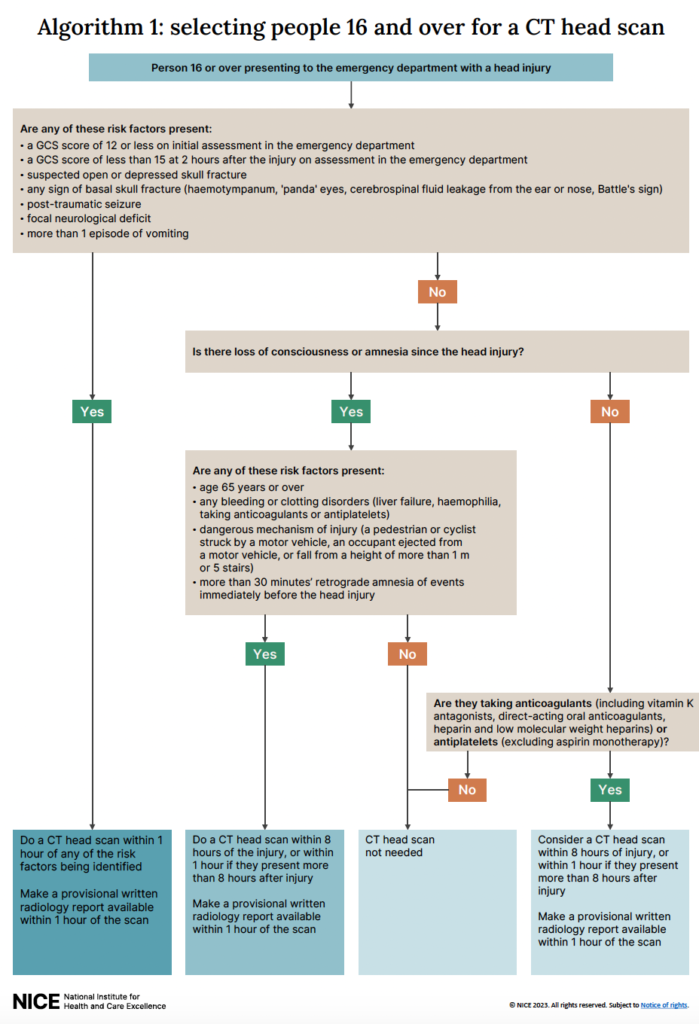
NICE guidelines – selecting which adults need a CT head
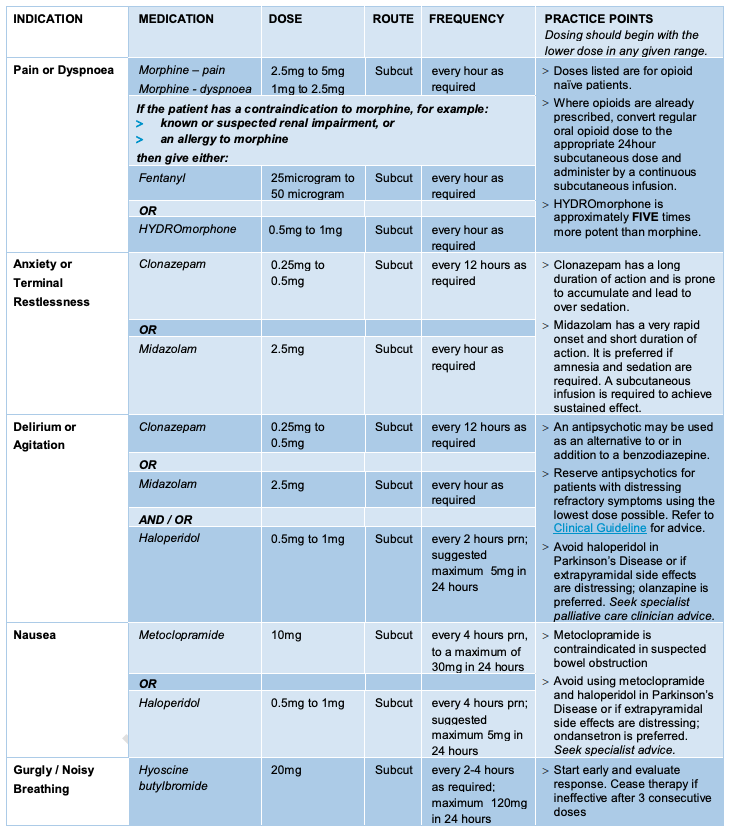
Medications to use in Palliative Care